
Help guides · Ask a question
Manage assistant credits and settings
- For
- Owners and administrators
- Booking system
- Hostaway and Uplisting
- Last checked
The artificial intelligence (AI) assistant can use included question credits or a model key supplied by your workspace. An administrator controls what it may receive.
Steps
- As an administrator, open AI assistant, then Settings, keys & usage.
- Open Ask a question to read the current credit balance and reset date.
- As an administrator, if you want to use your own model key, follow the key form and review what data may be sent.
- As an administrator, turn on the assistant only after checking the settings.
- Return to Ask a question to try a question about your figures.
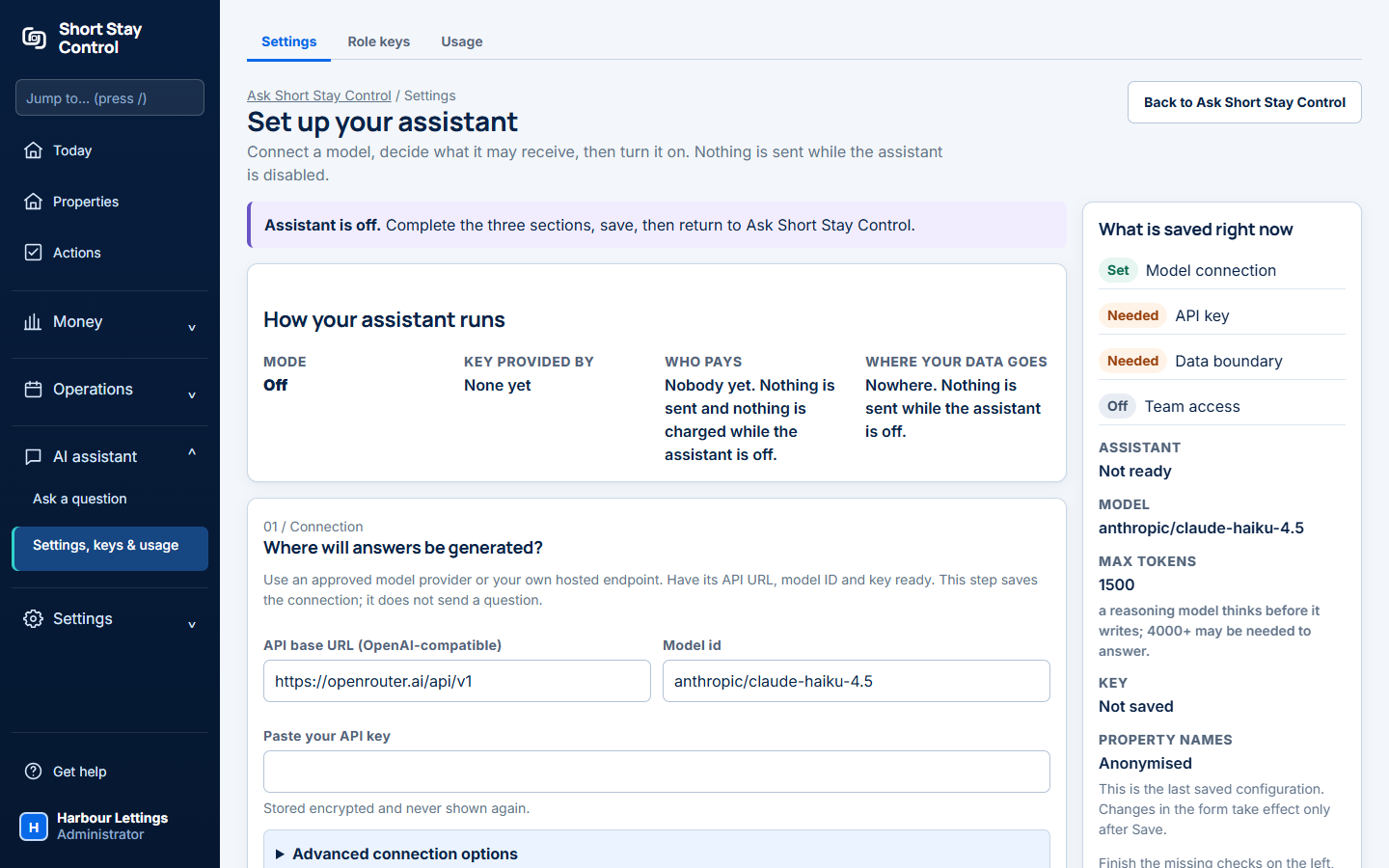
Figure 1. The administrator's assistant settings page.
What you will see
The Ask a question page says that one question uses one included credit, however long it is. A reply that could not use your figures, such as a question back to you, is not counted. Nothing is sent while the assistant is disabled. Any role with property viewing permission can open Ask a question, but only administrators can manage keys and usage.
If something goes wrong
- "The assistant is not ready to use yet." Complete the settings and check whether a model is available.
- "Assistant ready, using the included assistant." You do not need to add your own key to use the included option.
- "You have used this month's questions." Check the reset date on Ask a question, or ask an administrator about the available choices.