
Help guides · Money
Review finance exceptions
- For
- Owners and administrators, Finance, Management read-only
- Booking system
- Hostaway and Uplisting
- Last checked
Finance exceptions identify missing or uncertain information that could change a report.
Steps
- Open Money, then Finance exceptions.
- Read each property row and select Review costs or Match property first, as shown.
- Check the property's source information and evidence before making a correction.
- Return to the exception list and confirm whether the item has cleared.
Finance and management read-only: open Finance exceptions directly from the main menu.
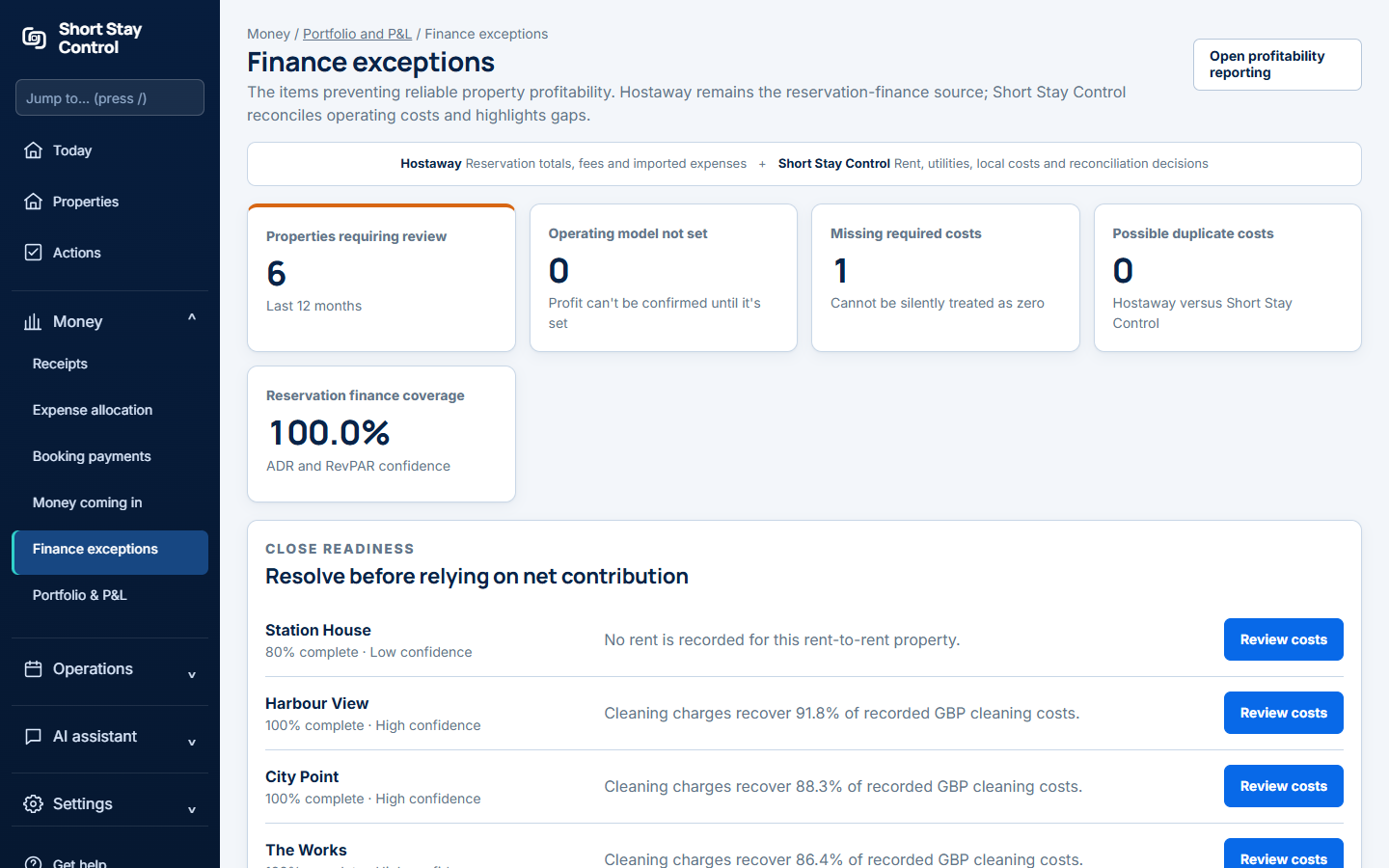
Figure 1. Finance exceptions in the demonstration workspace.
What you will see
The list draws attention to records that do not meet the current completeness rules. Clearing this screen does not itself certify the accounts. Finance members and administrators can review it; the ability to change the underlying record depends on the member's permissions.
If something goes wrong
- "No finance exceptions" means all active properties currently meet the recorded completeness rules. The page still says that a qualified reviewer should approve period-end figures.
- If an exception points to an unverified property, check its listing match and the evidence document before allocating costs.
- If an imported item has not updated, check Connections for the last successful sync.