
Help guides · Costs
Download an owner statement for a property
- For
- Owners and administrators, Finance, Management read-only
- Booking system
- Hostaway and Uplisting
- Last checked
An owner statement is an Excel workbook for one property and one period. It shows net booking income, costs and the balance month by month, then lists every booking and every cost line behind those figures.
Steps
- Open Properties, choose a property, then open Costs and Operating costs.
- Find the Owner statement section near the top of the page.
- Check the two dates. They start as the last twelve complete months. Change them to the period you want.
- Press Download owner statement.
- Open the downloaded file in Excel or another spreadsheet program.
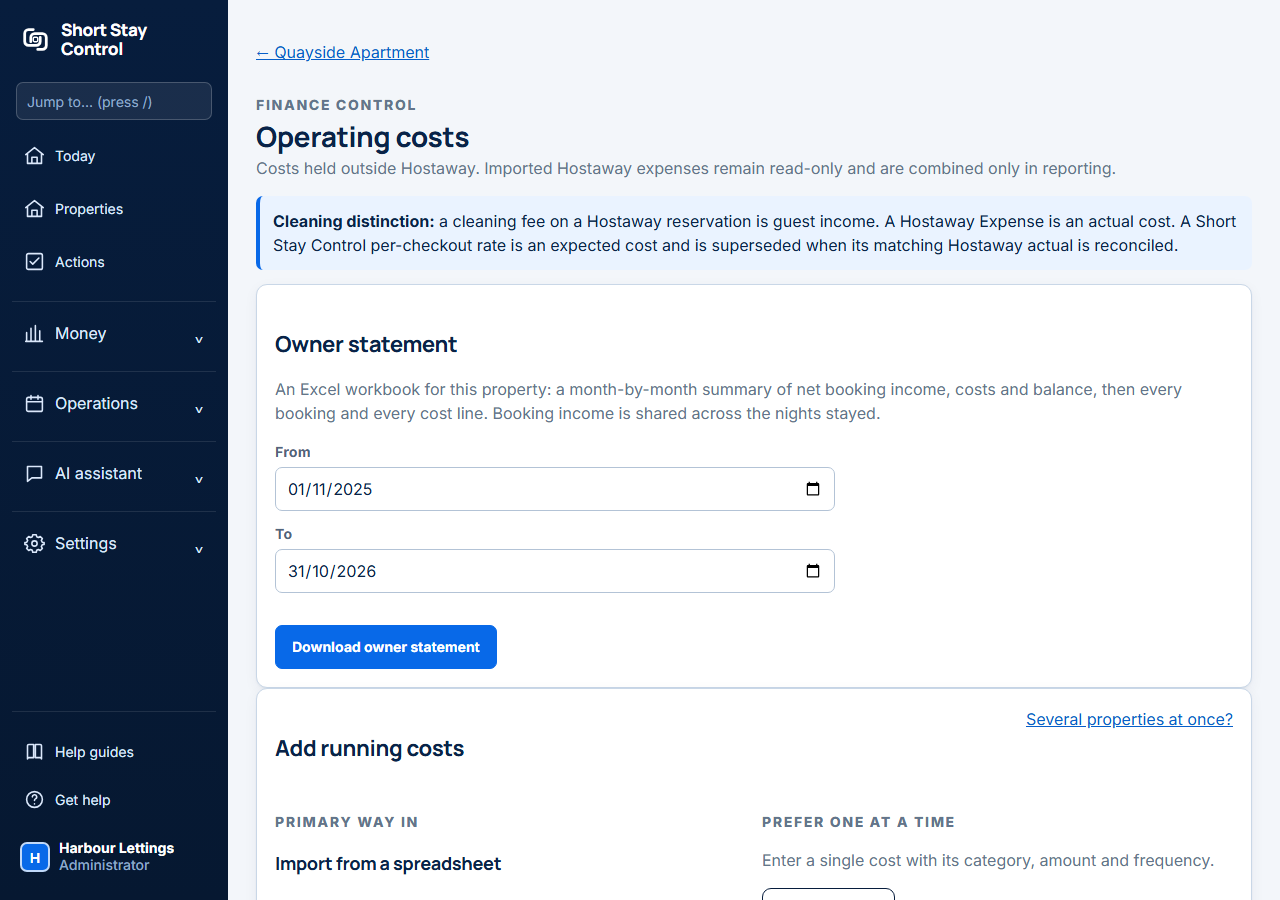
Figure 1. The Owner statement section on an invented property.
What you will see
The workbook has six sheets. Every figure is a stored number, so it shows even when Excel opens the download in Protected View.
- Summary comes first: net booking income, total outgoings, final balance and occupancy for the whole period, one sentence saying whether the property made a surplus or a shortfall, and anything in the data that needs checking.
- Monthly overview has one row for each month, with a total row. Amounts carry the currency symbol, a shortfall is red and a surplus is green.
- Charts shows income, outgoings and final balance by month, occupancy by month, and where the money went by month.
- Bookings lists every booking with at least one night in the period: platform, dates, nights, what the guest paid, the commission recorded, the net income and how that net was arrived at.
- Expenses lists every cost line counted, with its category, type, source and the overview column it is added to. A recurring cost has one line for each time it falls due.
- Notes explains each term for the person reading the statement.
When something in the data could make a figure wrong, the Summary sheet shows Check before you rely on this. Each line says how many items are affected, and those rows are marked in the Check column of the Bookings or Expenses sheet. It covers possible duplicate costs still waiting for a decision, rent, mortgage or a recurring bill counted twice because someone chose Keep both, a booking system figure for one of those that is very different from the amount entered here, a receipt and the monthly amount entered for the same bill that are both counted (because the receipt is much larger or smaller and is waiting for a choice, or because someone chose Count both), bookings with no payout or commission from the booking system, bookings with no guest total, and amounts in another currency.
Booking income is shared across the nights stayed. A stay from 28 January to 3 February puts four nights of income in January and two in February. The dashboard places the whole booking in its arrival month, so a month can differ between the two. The costs are exactly the lines the profit and loss counts for the property.
Occupancy in the statement is nights occupied divided by the calendar nights in the month. The dashboard may show a different figure because it follows your workspace's occupancy method.
If something goes wrong
- The Owner statement section is missing. Your role needs permission to view financial figures, and the property must be matched to a listing in your booking system. Ask an administrator.
- "The start date must be on or before the end date." Swap or correct the dates.
- "Choose a period of 36 months or fewer." Shorten the period, or download two statements.
- A cost is missing from the statement. Add it under Recorded internal costs first. See [Record rent or a mortgage that repeats every month](14-rent-mortgage-and-recurring-costs.md) and [Add a property's running costs](13-property-running-costs.md).
- A booking shows no commission. The booking system holds no commission for it. A direct booking has none. For any other channel the guest total is used, the booking is marked in the Check column, and net booking income is overstated until the commission is known.
- The statement warns of possible duplicate costs. Decide each one under Hostaway reconciliation on the same page. Rent, mortgage and the recurring bills (internet, electricity, gas, water, council tax and insurance) never need this: the booking system's figure for a month is the only one counted.
The statement is a management summary. It is not a bank statement, a payout record or statutory accounts. Administrators, finance members and management read-only members can download it. Other roles can once an administrator grants them financial viewing. Facilities members also need the home assigned to them.