
Help guides · Costs
Record rent or a mortgage that repeats every month
- For
- Owners and administrators, Operations managers, Office managers, Finance, Facilities coordinators
- Booking system
- Hostaway and Uplisting
- Last checked
Rent and mortgage payments are entered once. Short Stay Control then counts the payment in every month of your profit and loss, from the start date you give, including months that have already passed.
Steps
- Open Properties, choose a property, then open Costs and Operating costs.
- Under Required costs & completeness, check the operating model. It should read Rent-to-rent (we pay rent) if you pay a landlord, or Owned (we pay a mortgage) if you own the home. To change it, open Change operating model, choose the right one and press Save operating model & go-live date.
- Open Add one cost.
- Choose the category Rent or Mortgage to match the operating model.
- Enter a description, the amount of one payment and the currency.
- Set the frequency to Monthly.
- Check the start date. It is filled in with the date the property's bookings went live. Keep it to count the payment from the first month the home traded.
- Leave the end date empty while the payment continues.
- Press Add operating cost.
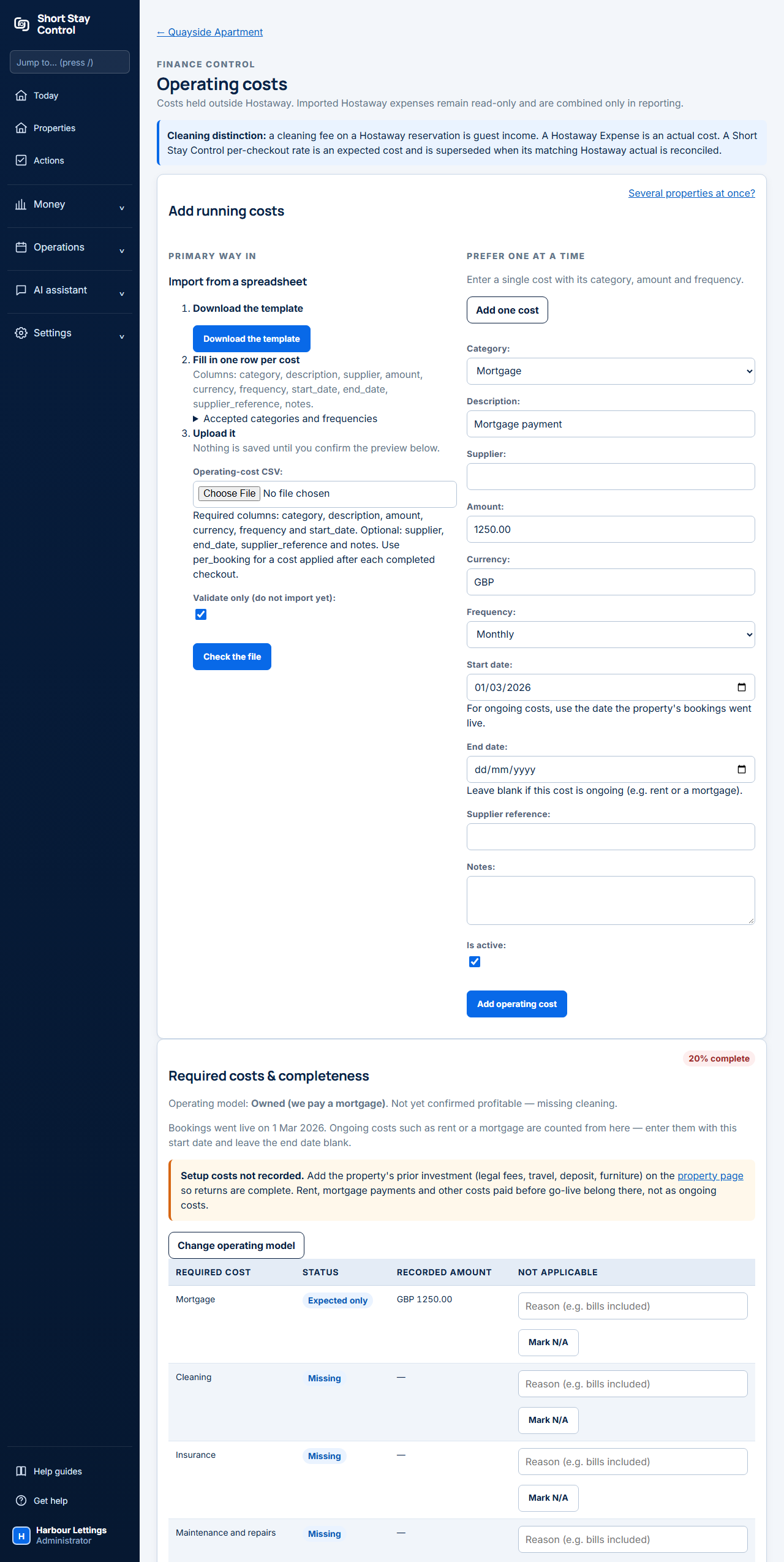
Figure 1. Adding a monthly mortgage to an invented property. The start date is already filled with the go-live date.
What you will see
The payment appears under Recorded internal costs with its frequency and period. The row for rent or mortgage under Required costs & completeness is no longer missing.
The badge beside Required costs & completeness shows how many of the required costs are recorded. It is green at 100% complete. It is amber when the rent or mortgage and the cleaning are recorded and another required cost is still missing. It is red when the rent, the mortgage or the cleaning is missing. A second label says Backed by bills when the rent or mortgage and the cleaning both appear as bills from your booking system, and Entered by hand when one of them is only typed in here. Both count in full.
In the profit and loss, rent and mortgage share one line, Rent / mortgage. One payment is deducted in every month from the start date. A payment dated the 31st falls on the last day of shorter months.
Nothing is stored month by month. The months are worked out from the start date each time a report opens, so correcting the start date or the amount corrects every past month at once.
Rent or mortgage: which one
Both go to the same profit and loss line, so the profit figure is the same either way. They are not interchangeable for the completeness check. A rent-to-rent home needs a cost in the category Rent. An owned home needs a cost in the category Mortgage. Use the category that matches the operating model, or the home stays unconfirmed even though the payment is counted.
Backdating and changes
- Past months: set the start date to the first month the payment applied. Every month from then until today is filled in.
- Before bookings went live: rent or mortgage paid before the go-live date is part of your setup investment. Record it as a setup cost on the property page, not as an ongoing cost.
- The payment changed: press Edit on the old cost and give it an end date in the last month at the old amount. Then add a second cost at the new amount, starting the next month. Each is counted only between its own dates.
- The payment stopped: press Edit and enter the end date.
- Other repeats: Weekly and Annual repeat in the same way. One-off is counted once on its start date. Per completed checkout is counted once for each finished booking and suits cleaning.
If the same payment is also in Hostaway
A Hostaway expense is counted in the month it is dated. For rent, mortgage and the recurring bills (internet, electricity, gas, water, council tax and insurance), Hostaway's figure for a month is the only one counted, whatever the amount. The cost you entered here as weekly or monthly is used only for months Hostaway has nothing for. A one-off or annual cost is never replaced automatically; it is listed for you to decide. Insurance is the one exception to "whatever the amount": Hostaway's line replaces your monthly premium only when it is within 15% of it, and never when it is an excess or a claim, because insurance is often paid once a year. You do not need to do anything, and Hostaway does not need to hold a supplier name or reference for the two to be tied together. Under Hostaway reconciliation at the foot of the page, those months read Automatic: Hostaway figure used for this month. If the two really are separate payments, press Keep both.
For every other kind of cost, the page says "Exact same-amount matches are automatically counted once." Where the amounts differ, press Use Hostaway actual to count the Hostaway figure for that month, or Keep both if they are two separate costs. Until you choose, both are counted.
On Uplisting this section does not appear, because Uplisting does not send costs.
If you upload the receipt for a bill you entered as a monthly amount
A monthly amount for gas, electricity, water, internet, council tax, insurance, rent or a mortgage is your estimate. When you upload and approve the receipt for a month, the receipt is counted in place of the monthly amount for that month, so the bill is not counted twice. Months with no receipt keep the monthly amount. This works on Hostaway and on Uplisting.
The page shows this under Receipts and your monthly amounts:
- A receipt much larger or much smaller than the monthly amount is not applied by itself. A much larger one may cover several months, and a much smaller one may be only part of the bill. Press Count the receipt only or Count both. Each button shows the figure you will get for that month. Until you choose, both are counted.
- If the bill is for more than one month, such as a quarterly gas bill or a yearly insurance premium, press It covers several months, choose the first and last month it covers, and press Count ... for these months. The receipt is counted once, in the month it is dated, and your monthly amounts for the months you chose are left out. You can choose up to 12 months, before or after the date on the bill. If one of those months already had its own bill, nothing more is left out for it, and the page says so.
- Open receipts counted in place of your monthly amount to see the receipts that were applied. If a receipt was for a different bill, press Count both instead.
- Open choices you have made to see your choices. Press Change to choose again.
Unless you say it covers several months, a receipt replaces the month it is dated in, and one monthly amount only. A receipt for a repair, such as a gas safety certificate, is a separate cost and never replaces the gas amount. An insurance receipt within 15% of your monthly premium replaces it. One of a different size, such as a year paid at once, waits for your choice. An excess or a claim is never treated as the premium. A cost you type in as a one-off is not treated as a receipt.
If something goes wrong
- "End date cannot be before the start date." Correct one of the two dates.
- "Enter a three-letter currency code." Use a code such as GBP.
- "No rent is recorded for this rent-to-rent property." Add a cost in the category Rent, or change the operating model if the home is owned.
- "No mortgage cost is recorded for this owned property." Add a cost in the category Mortgage, or change the operating model if the home is rented.
- The page lists Possible double entries. These are expenses in your booking system with a matching date, amount and description, or costs entered here twice: the same category, amount and frequency on the same date or over the same months. For rent, mortgage and the recurring bills the description does not need to match. Every entry is counted. If one is a mistake, remove it in the booking system or delete it on this page. If every entry in a set is genuine, choose All genuine and the set is not listed again. The list is for you only and is not shown on the owner statement.
- The page lists Bills that look missing. Each is a regular bill this property normally has (rent, mortgage, council tax, gas, electricity, water, internet or insurance) with nothing recorded for some months, in the booking system or here. A bill is judged by its own rhythm: a water bill that comes every three months is only listed when a whole three months pass without one, and council tax is not listed for February and March, when most councils take no instalment. Add the missing cost, or, if no bill was due, choose No bill was due and the gap is not listed again. The list is for you only and is not shown on the owner statement.
- A cost is marked Switched off: not counted in your figures. Choose Edit, tick Is active and save.
- The profit and loss shows a cost twice in one month. Rent, mortgage and the recurring bills are counted once automatically. For any other cost, check Hostaway reconciliation as described above.
Administrators, operations managers, office managers and finance members can add and change these costs when their role permits it. Facilities members can do so for the homes assigned to them. To enter costs for several homes in one upload, see [Add a property's running costs](13-property-running-costs.md). To read the result, see [Read profit and loss](26-profit-and-loss.md).