
Help guides · Before you sign up
Find the sign-up page
- For
- People choosing a plan
- Booking system
- Hostaway and Uplisting
- Last checked
The sign-up page starts a Short Stay Control trial for a business that already uses Hostaway or Uplisting.
Steps
- Open the sign-up page.
- Enter the number of properties you run and choose your live booking system.
- Read the price and trial wording shown for your choices.
- Enter your name, work email and business name.
- Complete the bot check, read the service terms and privacy notice, tick the agreement box and press Start my free trial.
- Stripe handles the card on its own page. See [Getting started](01-getting-started.md) for the email, password and two-step sign-in that follow.
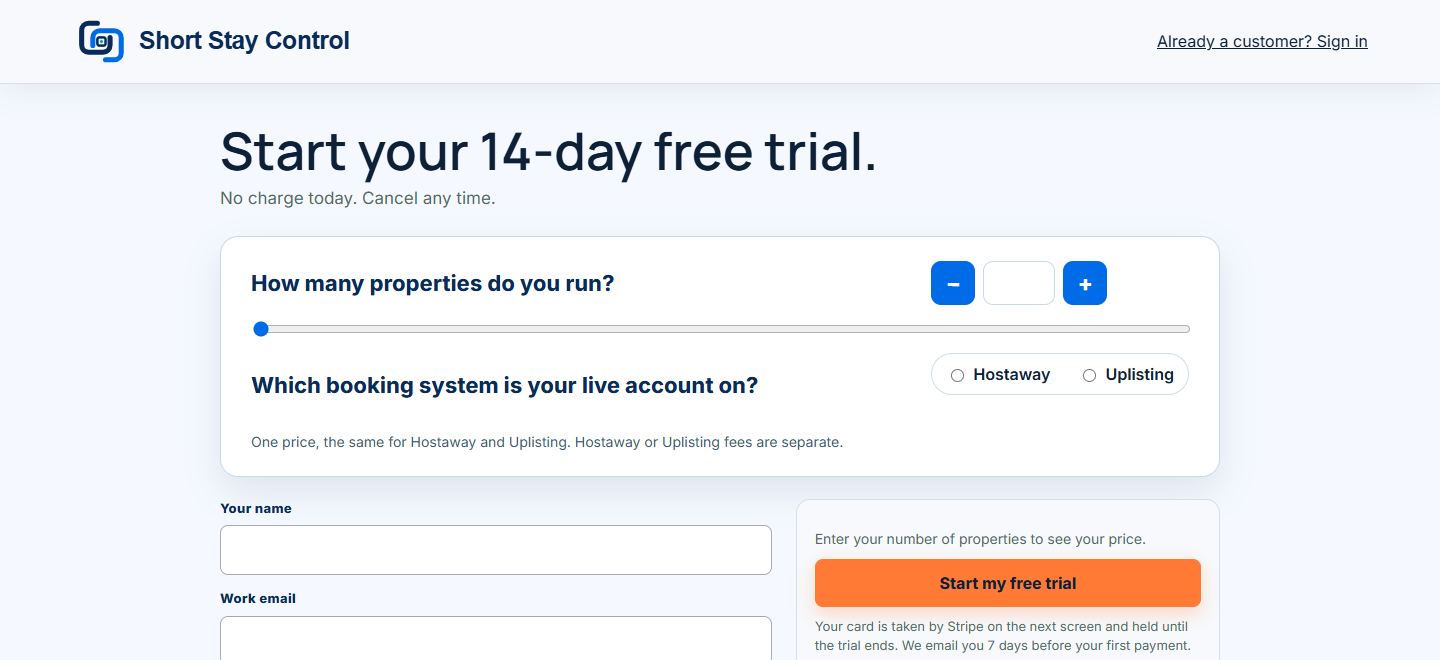
Figure 1. The local test sign-up page. No personal details or card were entered.
What you will see
The page says "Start your 14-day free trial. No charge today. Cancel any time." It shows the price before you continue and says Hostaway or Uplisting fees are separate. It says an email reminder is sent 7 days before the first payment. Your card is entered on Stripe's page, which is not shown here.
If something goes wrong
- "Enter your number of properties to see your price." Fill in the property count first.
- If you already have a workspace, use Already a customer? Sign in instead of starting another trial.
- If the card step does not complete, return to the sign-up flow or use the questions panel. Do not send card details to support.